
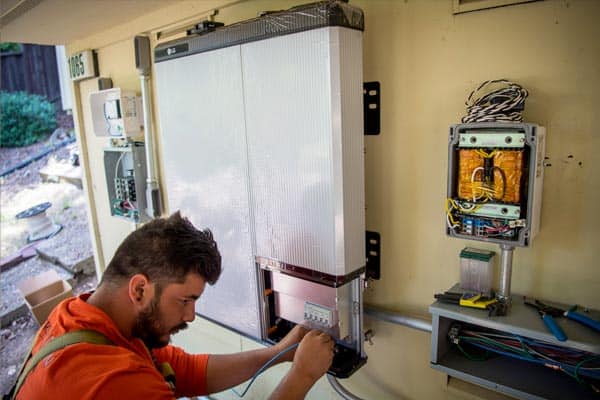
There are plenty of good reasons to shut down your solar inverter. Maintenance, an electrician visit, a storm warning, or just resetting after a fault. Whatever the reason, doing it in the right order matters. Get it wrong and you risk damaging equipment or, worse, getting a shock.
This guide walks through the safe shutdown process for a standard grid-tied residential solar system. If you have a battery system, there are extra steps covered below.
When Would You Need to Turn Off Your Inverter?
Most homeowners never need to touch their inverter. But there are situations where a shutdown is necessary:
- An electrician is working on your switchboard or wiring
- You’re experiencing a fault or error code that requires a reset
- Severe weather is approaching (cyclone, severe storm, flooding)
- Roof work or panel cleaning that requires the system to be isolated
- Your energy retailer or network provider has requested it
- Fire brigade or emergency services require electrical isolation
The Correct Shutdown Order
The order matters. You always disconnect AC first, then the inverter, then DC. This is the industry-standard sequence that prevents arcing and protects the inverter.
Step 1: Turn Off the AC Isolator
The AC isolator (sometimes called the AC disconnect) sits between the inverter and your switchboard. It’s usually a small switch mounted on the wall near the inverter or inside the switchboard itself.
- Flip the AC isolator to the OFF position.
- This disconnects the inverter from your home’s electrical system and the grid.
Step 2: Turn Off the Inverter
Most inverters have a physical on/off switch or rocker on the unit itself.
- Switch the inverter to OFF.
- The display should go blank within a few seconds.
- Some models show a shutdown sequence on the screen before powering down.
Step 3: Turn Off the DC Isolator
The DC isolator sits between your solar panels and the inverter. It’s usually a rotary switch on or near the inverter, or mounted on the roof near the panels.
- Turn the DC isolator to the OFF position.
- This stops the flow of power from the panels to the inverter.
Quick Reference: Shutdown Sequence
| Step | Component | Location | Action |
|---|---|---|---|
| 1 | AC Isolator | Near inverter or in switchboard | Switch to OFF |
| 2 | Inverter | On the inverter unit | Switch to OFF |
| 3 | DC Isolator(s) | On/near inverter or on roof | Turn to OFF |
How to Turn Your Inverter Back On
When you’re ready to restart, reverse the order:
- Turn the DC isolator(s) to ON.
- Switch the inverter to ON.
- Turn the AC isolator to ON.
The inverter will run through a startup sequence that usually takes one to five minutes. It checks grid voltage and frequency before it starts exporting power. This is normal and required by Australian standards (AS/NZS 4777.2).
If You Have a Battery System
Systems with a solar battery have additional components that need attention during a shutdown.
- Follow the standard AC > Inverter > DC shutdown sequence first.
- Then turn off the battery isolator (usually located on or near the battery unit).
- Some hybrid inverters manage the battery internally. Check your manual for model-specific steps.
- When restarting, turn the battery isolator on before the DC isolator.
If you’re unsure about your battery shutdown procedure, contact SolaXs and we’ll walk you through it.
Common Mistakes to Avoid
A few things people get wrong when shutting down their solar system:
- Turning off DC before AC: This is the most common mistake. Always disconnect AC first. Disconnecting DC under load can cause arcing at the isolator switch.
- Forgetting the DC isolator: The inverter display going blank doesn’t mean the system is fully isolated. DC power still flows from the panels until the DC isolator is off.
- Opening the inverter casing: Never open the inverter. Internal capacitors can hold charge even after shutdown. Leave internal work to a licensed electrician.
- Assuming panels are off at night: Moonlight and street lights can produce small amounts of voltage. Always treat the DC side as live.
Emergency Shutdown
In an emergency (fire, flood, electrical fault), the priority is speed and safety:
- Turn off the main switch at the switchboard to isolate your home from the grid.
- If safe to do so, turn off the AC isolator and DC isolator at the inverter.
- Move away from the area and call emergency services.
- Inform emergency responders that you have a solar system installed. Solar panels on the roof remain live and cannot be turned off remotely.
When to Call a Professional
A standard shutdown and restart is safe for any homeowner. But call a licensed solar electrician if:
- The inverter won’t restart after following the correct sequence
- You see burn marks, melting, or smell something unusual at the isolator or inverter
- The inverter displays a persistent fault code after restarting
- You need to isolate the system for major electrical work
- You’re unsure which switches belong to your solar system
SolaXs has been installing and servicing residential solar across the Mid North Coast for over 25 years. If you’re not sure about anything, give us a call and we’ll help you out.
What This Means for Mid North Coast Homeowners
The Mid North Coast is one of the best regions in Australia for solar. With around 5.2 peak sun hours per day and rising electricity prices, the numbers keep improving for homeowners who go solar.
- High solar yield: Port Macquarie, Coffs Harbour, and surrounding areas receive consistent sunlight year-round. Even in winter, a well-sized system produces enough to cover most daytime usage.
- Rising grid costs: Electricity prices on the Mid North Coast have increased by more than 20% over the past three years. Solar locks in a fixed energy cost for 25 years.
- Strong feed-in tariffs are gone: The days of generous feed-in rates are over. Self-consumption is now the key to savings, which makes system sizing and battery storage more important than ever.
- Local installers matter: When something goes wrong, you want an installer who can be on your roof the same week, not a company based in Sydney or Melbourne.
SolaXs has been installing and servicing solar systems in the Port Macquarie region for over 25 years. Get a free quote tailored to your property and energy usage.
Brand-Specific Shutdown Tips
While the AC-first, then inverter, then DC sequence applies to all systems, some inverter brands have quirks worth knowing about. Here is what to expect from the most common brands installed on the Mid North Coast.
| Brand | Shutdown Notes |
|---|---|
| Fronius | The display stays lit for up to 30 seconds after switching off. This is normal capacitor discharge. Wait for it to go fully blank before touching the DC isolator |
| GoodWe | Some GoodWe models have an internal DC switch as well as an external one. Check your manual to confirm you have isolated both |
| Sungrow | Sungrow hybrid inverters with a connected battery may continue operating in backup mode even after the AC isolator is off. Disconnect the battery isolator separately |
| SMA | Older SMA Sunny Boy models have a rotary DC disconnect built into the base of the unit. Turn it to the O position after switching off the AC side |
| Enphase (micro) | Microinverter systems do not have a central inverter switch. Turn off the AC isolator at the switchboard. Each microinverter shuts down automatically when AC is removed |
If your system was installed by SolaXs, we label all isolators and switches during installation. Look for the yellow or white labels near your switchboard and inverter that indicate the correct shutdown sequence.
How Often Should You Shut Down Your System?
Under normal conditions, you should not need to shut down your solar system at all. Modern inverters are designed to run continuously for years without intervention.
That said, there are a few situations where a periodic restart can help.
- After a firmware update – Some inverters need a power cycle to apply new firmware. Your installer or monitoring app will let you know
- Persistent minor fault codes – If the inverter shows a low-priority fault that clears and returns, a full shutdown and restart (AC off, inverter off, DC off, wait 60 seconds, then reverse) often resolves it
- After a prolonged grid outage – Some inverters can get stuck in a reconnection loop after extended blackouts. A clean restart resets the grid-sync process
- Annual panel cleaning – If you are getting your panels cleaned, shut the system down while anyone is on the roof. It is safer and most cleaning companies will ask for it
If you find yourself restarting your inverter more than once a month, something is wrong. Contact SolaXs for a system health check rather than continuing to reset it.
For more information, see the Clean Energy Council solar inverter buyers guide and the Australian Government Small-scale Renewable Energy Scheme.